
Canceling a gym membership can feel frustrating, especially when you’re unsure which method actually works. If you’ve been searching for how to cancel Planet Fitness membership, you’re not alone. Many members wonder whether they can cancel online, through the app, by phone, or if they need to visit their local club.
The good news is that canceling your Planet Fitness membership is usually straightforward when you follow the official process. Most memberships can only be canceled by visiting your home club in person or by sending a signed cancellation request through certified mail. Cancellation through the website, phone, email, or app isn’t available in most states. However, some locations, including certain clubs in California, may offer online cancellation options due to local consumer protection laws.
Whether you’re looking for how to cancel Planet Fitness membership online, how to cancel Planet Fitness membership without going in, or simply want to avoid unexpected charges like the annual fee, this guide walks you through every step. You’ll learn the official cancellation methods, important billing deadlines, common mistakes to avoid, and what to do if you’re unable to visit your home club. By the end of this guide, you’ll know exactly how to cancel your membership with confidence.
Planet Fitness Cancellation Methods at a Glance
| Cancellation Method | Available | Best For | Processing Time |
|---|---|---|---|
| Visit Your Home Club | ✅ Yes | Fastest and most reliable option | Usually same day |
| Certified Mail | ✅ Yes | Members who can’t visit in person | Typically 5–7 business days after delivery |
| Online Cancellation | ⚠️ Limited | Available only in selected locations | Varies by club |
| Planet Fitness App | ❌ Usually No | Account management only | Not available for most members |
| Phone or Email | ❌ No | Not accepted for cancellation | Not applicable |
Note: Cancellation policies may vary by club location and membership agreement. Always confirm the latest requirements with your home club before submitting a cancellation request.
How to Cancel Your Planet Fitness Membership in Person
For most members, canceling in person is the fastest and simplest option. Planet Fitness generally requires you to visit the home club where you originally signed up. Even if you have a PF Black Card membership that allows access to multiple locations, your home club is typically responsible for processing your cancellation.

Step 1: Visit Your Home Club
Go to the Planet Fitness location where your membership was originally created. If you’re unsure which club is listed as your home club, check your membership agreement or sign in to your Planet Fitness account to verify your information before visiting.
Bringing a valid photo ID, such as a driver’s license, state ID, or passport, can help staff quickly locate your membership.
Step 2: Request Membership Cancellation
Once you arrive, let the front desk staff know that you’d like to cancel your membership.
A team member will access your account and provide a cancellation form. While they may ask why you’re leaving, you’re generally not required to give a reason. If the club offers alternatives—such as freezing your membership—you can consider those options before making your final decision.
Step 3: Complete the Cancellation Form
Fill out the cancellation form carefully. Depending on your location, you may be asked to confirm information such as:
- Full name
- Membership ID (if available)
- Address
- Contact information
- Signature
Before signing, review the form to make sure you understand your effective cancellation date and whether any remaining membership or annual fees may still apply.
Step 4: Request Written Confirmation
Never leave the club without asking for proof that your cancellation request has been processed.
Request either:
- A printed cancellation receipt, or
- A confirmation email.
Keep this confirmation until you’ve verified that future membership charges have stopped appearing on your bank or credit card statement.
This simple step can save you time if you ever need to dispute an unexpected charge.
Important Billing Deadlines
Timing plays a major role in avoiding additional charges.
In general, Planet Fitness requires members to submit their cancellation request before the monthly billing deadline to avoid paying for another month of membership. If your request is submitted after the required cutoff date, you may still be responsible for one additional monthly payment.
If you’re planning to cancel before your annual fee, it’s important to submit your request well before that charge is scheduled. Missing the deadline could result in the annual fee being billed even if you’ve already decided to end your membership.
Because billing dates can vary by membership agreement and club location, always verify your next billing date with your home club before submitting your cancellation request.
Pro Tip: Before leaving the club, log in to your Planet Fitness account a few days later or review your next bank or credit card statement to confirm that your cancellation has been processed correctly. Keeping your cancellation confirmation until you verify billing has stopped provides extra protection in case any issues arise later.
How to Cancel Your Planet Fitness Membership by Certified Mail
If you can’t visit your home club, mailing a cancellation request is the official alternative accepted by most Planet Fitness locations. Many members use this option after moving to another city or when visiting the gym isn’t practical.
Using USPS Certified Mail is strongly recommended because it provides proof that your cancellation request was mailed and delivered.
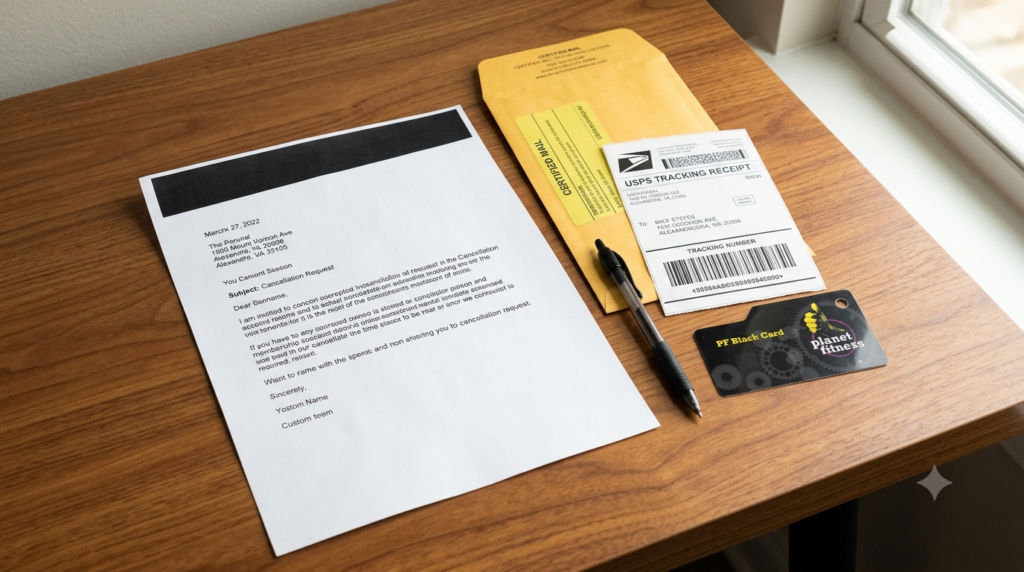
Step 1: Write Your Cancellation Letter
Your letter should be clear, professional, and include the information needed to identify your account.
Include:
- Your full name
- Current mailing address
- Phone number
- Email address (optional but recommended)
- Membership ID (if available)
- A statement requesting cancellation of your Planet Fitness membership
- The date
- Your signature
Keep your request simple. There’s generally no requirement to explain why you’re canceling your membership.
Step 2: Send the Letter to Your Home Club
Many members make the mistake of sending their cancellation request to Planet Fitness corporate offices.
Instead, your certified letter should be mailed directly to the Planet Fitness home club where you originally signed up.
If you’re unsure which location is your home club, check your membership agreement or your online account before mailing the letter.
Step 3: Mail It Using Certified Mail
Take your completed letter to your local post office and send it using USPS Certified Mail.
Certified Mail provides:
- Proof that your letter was mailed
- A tracking number
- Confirmation that your home club received your cancellation request
Keep your mailing receipt and tracking information until you’ve confirmed that your membership has been canceled.
Step 4: Verify Your Cancellation
After your letter has been delivered, allow your home club several business days to process your request.
Continue checking:
- Your email for a confirmation notice
- Your bank statement
- Your credit card statement
Don’t discard your Certified Mail receipt until you’ve confirmed that recurring membership charges have stopped.
Can You Cancel a Planet Fitness Membership Online?
One of the most common searches is how to cancel Planet Fitness membership online.
For most members, the answer is no.
Planet Fitness generally does not allow membership cancellations through its website, email, live chat, or phone support. Instead, members are usually required to cancel in person at their home club or by certified mail.
However, cancellation options can vary depending on state laws. For example, some California members may have access to online cancellation due to local consumer protection regulations.
Always check your membership agreement or contact your home club to confirm which cancellation options are available in your area.
Can You Cancel Through the Planet Fitness App?
Many people also search for:
- how to cancel Planet Fitness membership on app
- how to cancel Planet Fitness membership through app
- how to cancel Planet Fitness membership via app
- how to cancel Planet Fitness membership from app
Although the Planet Fitness app allows members to manage workouts, digital check-ins, and membership information, most members cannot cancel their membership directly through the app.
If app cancellation is available in your location, you’ll typically be guided through the available cancellation process after signing into your account. Otherwise, you’ll need to cancel using one of the official methods discussed above.
Can You Cancel Without Going to the Gym?
Yes.
If you’re searching for how to cancel Planet Fitness membership without going in, sending a signed cancellation request through Certified Mail is generally the accepted alternative.
This option is especially useful if:
- You’ve moved to another city or state
- Your home club is too far away
- You’re unable to visit because of work, school, or personal circumstances
Certified Mail provides documentation that your request was sent and delivered, giving you additional protection if you ever need to dispute future charges.
Important Annual Fee & Billing Deadlines
Understanding Planet Fitness billing dates can help you avoid unexpected charges after deciding to cancel.

Monthly Membership Billing
Planet Fitness generally requires cancellation requests to be submitted before your monthly billing deadline.
If your cancellation request is received after the required cutoff date, you may still be charged for one additional month before your membership officially ends.
Because billing schedules may vary between clubs and membership agreements, it’s always a good idea to confirm your next billing date with your home club.
Annual Membership Fee
In addition to monthly dues, many Planet Fitness memberships include an annual fee that’s charged once each year.
If your cancellation request isn’t processed before your annual fee is due, you’ll generally still be responsible for paying that charge.
For members planning to cancel specifically to avoid the annual fee, it’s best to submit your cancellation request well in advance of the scheduled billing date rather than waiting until the last minute.
Commitment Memberships and Buyout Fees
Some Planet Fitness memberships are month-to-month, while others include a commitment period.
If you’re enrolled in a commitment-based membership and choose to cancel before the agreement ends, additional charges—such as a buyout fee—may apply according to the terms of your membership contract.
Review your original membership agreement or speak with your home club if you’re unsure which type of membership you have.
Tips to Avoid Extra Charges
Before canceling your membership, remember these best practices:
- Submit your cancellation request as early as possible
- Verify your next monthly billing date
- Check when your annual fee is scheduled
- Keep your cancellation confirmation or Certified Mail receipt
- Review your bank or credit card statements for the next billing cycle to ensure recurring payments have stopped
Planning ahead can help you avoid unnecessary fees and make the cancellation process much smoother.
What Happens If You Have an Outstanding Balance?
One of the most common reasons a Planet Fitness membership isn’t canceled immediately is an outstanding account balance.
This usually happens when your payment method expires, your credit or debit card is replaced, or your bank account information changes without being updated on your membership. As a result, your monthly dues continue to accrue, creating an unpaid balance on your account.
Having an outstanding balance doesn’t always prevent you from requesting cancellation, but it may delay the process until the issue has been addressed.
How to Resolve an Outstanding Balance
If you believe you have unpaid charges, contact your home club as soon as possible.
A staff member can:
- Explain why your balance exists
- Review any missed monthly payments
- Discuss available payment options
- Determine whether any late fees can be reduced or waived based on your situation
Addressing the balance early can help make the cancellation process much smoother.
Can You Freeze Your Membership Instead of Canceling?
If you’re taking a temporary break from the gym, canceling your membership may not be your only option.
Many Planet Fitness clubs allow eligible members to freeze or pause their membership for a limited time instead of canceling completely. This option is commonly used by members who are:
- Recovering from an injury
- Traveling for an extended period
- Relocating temporarily
- Taking a short break from working out
During a membership freeze, recurring monthly dues may be suspended or reduced depending on your membership agreement and your club’s policy.
If you’re unsure whether freezing is available, speak with your home club before submitting a cancellation request.
Planet Fitness Refund Policy
A question many members ask after canceling is whether they can receive a refund for membership charges or annual fees.
In most situations, Planet Fitness does not provide refunds for membership dues or annual fees that have already been processed.
However, there are a few situations where a refund may be considered.
You May Qualify for a Refund If:
Billing Error
If your membership was successfully canceled but you continued to be charged afterward, contact your home club immediately.
Having written proof of your cancellation—such as a confirmation email, cancellation receipt, or Certified Mail delivery confirmation—can help support your request.
Duplicate Charges
If you notice that your account was charged twice during the same billing period due to a processing error, your home club may be able to reverse the duplicate transaction.
Always review your monthly bank or credit card statements after canceling your membership.
Manager Approval
Some Planet Fitness locations may issue refunds at the discretion of the club manager.
Refunds are evaluated individually and are not guaranteed. Approval depends on the circumstances surrounding the charge and your membership history.
If Your Refund Request Is Denied
If you believe a charge was processed in error and your club is unable to resolve the issue, you may wish to contact your bank or credit card provider to dispute the transaction.
Keep any cancellation confirmations, payment records, and Certified Mail receipts available, as they may be requested during the dispute process.
How to Cancel a Planet Fitness Black Card Membership
Many members search for how to cancel Planet Fitness Black Card membership because they assume the process is different from a standard membership.
In most cases, it isn’t.
Black Card members generally follow the same official cancellation methods:
- Visit your home club and complete a cancellation form
- Mail a signed cancellation request through Certified Mail if you’re unable to visit in person
Keep in mind that any remaining financial obligations, including unpaid monthly dues or annual fees, may still apply according to your membership agreement.
If you’re unsure about your membership terms, ask your home club before submitting your cancellation request.
Frequently Asked Questions
Can I cancel my Planet Fitness membership online?
For most members, no. Planet Fitness generally requires cancellations to be completed either in person at your home club or by Certified Mail. Online cancellation is only available in certain locations where required by law.
Can I cancel through the Planet Fitness app?
Most members cannot cancel directly through the Planet Fitness app. The app is primarily designed for managing workouts, digital membership access, and club information.
Can I cancel my Planet Fitness membership withbout going in?
Yes. If you can’t visit your home club, sending a signed cancellation request through Certified Mail is generally the accepted alternative.
How do I cancel my Planet Fitness membership by mail?
Write a signed cancellation letter containing your name, contact information, membership details (if available), and a clear request to cancel. Mail it to your home club using Certified Mail and keep the tracking receipt.
Can I cancel my Planet Fitness membership without paying?
If your account has unpaid membership dues or other outstanding charges, your home club may require those obligations to be addressed before completing your cancellation.
Is there a cancellation fee?
Many month-to-month memberships do not include a cancellation fee. However, certain commitment-based memberships may require a buyout fee if canceled before the agreement ends. Check your membership contract for details.
Can I cancel at any Planet Fitness location?
Generally, no. Most memberships must be canceled through the home club where the membership was originally opened.
Will I receive confirmation after canceling?
Yes. Whether you cancel in person or by Certified Mail, always request or keep written proof of your cancellation and verify that recurring charges have stopped.
How long does it take for a cancellation to be processed?
Processing times vary by club. In-person cancellations are often processed quickly, while Certified Mail requests may require additional processing time after the club receives your letter.
Is information on Reddit always accurate?
Many people search for how to cancel Planet Fitness membership Reddit to read other members’ experiences. While these discussions can be helpful, individual experiences may differ from official club policies. Always confirm important details directly with your home club.
Final Thoughts
Knowing how to cancel Planet Fitness membership doesn’t have to be complicated. Whether you choose to visit your home club or send a Certified Mail cancellation request, following the correct procedure can help you avoid delays, unexpected billing, and unnecessary stress.
If you’re researching how to cancel Planet Fitness membership process, how to cancel Planet Fitness membership steps, how to cancel Planet Fitness membership by mail, or how to cancel Planet Fitness membership without going in, this guide provides everything you need to complete the process with confidence.
Before submitting your cancellation request, double-check your billing dates, keep copies of all cancellation documents, and monitor your bank or credit card statements until you confirm that recurring charges have ended. Taking these simple precautions can help ensure your Planet Fitness membership cancellation is processed smoothly and without unnecessary hassle.

Fitness and wellness writer dedicated to sharing practical workouts, smart nutrition, and sustainable healthy living tips.